Electric guitar questions & answers
Quick answers to help you play, practice, and find your way around the fretboard.
Is the ButtonBass electric guitar free to play online?
Yes. This virtual electric guitar is free to play in your browser, with no download or account required. Clean electric guitar samples suit riffs, melodies, and chord practice.
How do I strum with Pick mode?
Pick mode starts enabled. Move your mouse across fretboard notes to play them, then move back over a note to play it again. If you hear nothing at first, click a note to enable browser audio. Click the Pick mode: ON button to turn it off for normal click-to-play controls. On a phone or tablet, tap notes to play.
Which computer keys play the notes?
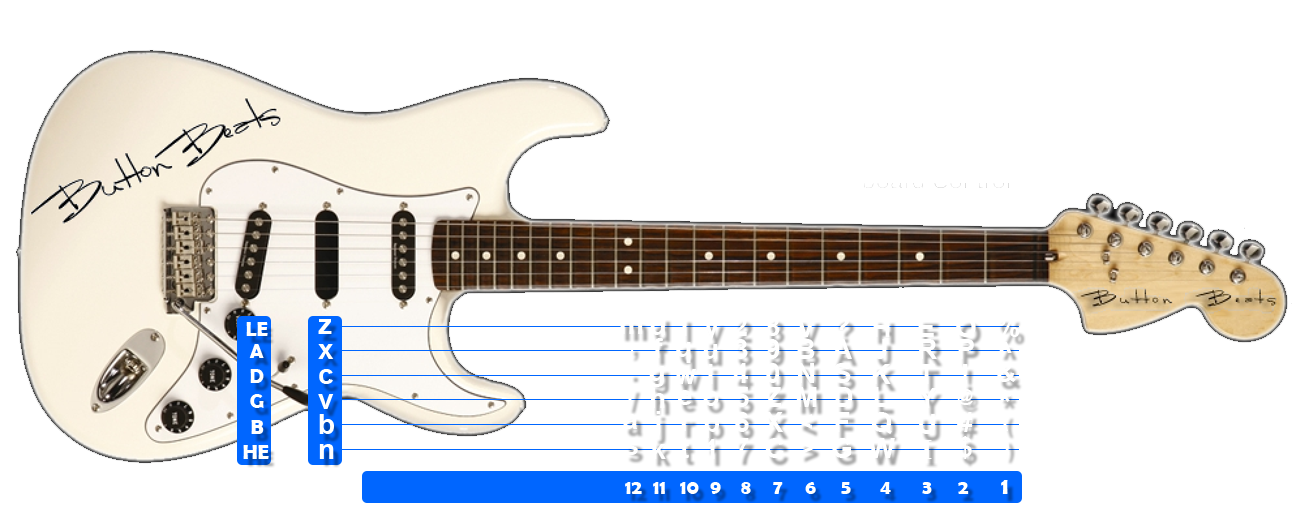
Turn on Keyboard keys above the fretboard to see each note’s shortcut. A shift arrow means hold Shift while pressing that key. Keyboard labels start hidden, and symbol shortcuts use a US keyboard layout.
How do I show the note names?
Check Note labels above the fretboard. Labels start hidden for a cleaner view. This setting is separate from Keyboard keys, so you can show either set of labels or both.
Why do notes light up during playback?
The fretboard highlights notes as they sound, whether you play them yourself or use song playback. The highlights help you follow a melody even when labels are hidden.
What does Follow playback do?
Follow playback scrolls the fretboard sideways to keep the sounding note in view. This is useful on narrow screens. Automatic scrolling pauses while Pick mode is enabled so the notes do not move underneath your mouse.
How do I play a song on the virtual electric guitar?
Choose a song from the Songs dropdown directly below the fretboard. The selected title stays visible. Use Play and Stop to control playback, and adjust the tempo to practice at your own pace.
Why can’t I hear the instrument?
Click or tap a note first: browsers may block audio until you interact with the page. Check your device volume, the browser tab’s mute setting, and your audio output. An internet connection is needed to load sounds that are not already cached.
About the ButtonBass Electric Guitar
The electric guitar is one of the most iconic instruments in modern music — versatile enough for shimmering clean chords, soulful blues bends, funky rhythm parts, and soaring lead lines. Since the 1950s it has shaped rock, pop, jazz, country, and countless other styles. Our free virtual electric guitar brings that clean, expressive tone to your browser, with no amp or real guitar required.
This free online guitar is part of ButtonBass, a music platform that has been helping people make music in the browser for over a decade. The electric guitar joins our family of string instruments alongside the acoustic and distorted guitars, the bass, and the banjo — all playable the same way, with a clickable fretboard, keyboard support, animated strings, and built-in songs.
How to Play the Virtual Electric Guitar
Click anywhere on the fretboard to hear clean electric guitar tones that respond instantly, or use your keyboard keys to play notes. The interactive layout shows every note position across the neck, so you can experiment with chords, melodies, and lead lines. Animated strings add a visual dimension as you play.
Pre-loaded songs are ready for instant playback — just hit Play. Use Stop to halt playback, Next and Previous to move between songs, and Clear to empty the note box. Sequence notes across the neck to work out your own part, and adjust the tempo value to speed things up or slow them down so you can nail a passage at your own pace.
A Short History of the Electric Guitar
The electric guitar emerged in the 1930s and 1940s as players looked for a way to be heard over loud big bands. Pickups and amplification turned the guitar into a lead instrument, and by the 1950s solid-body designs like the Fender Telecaster and Gibson Les Paul made it the centerpiece of rock and roll. Over the decades it became essential to nearly every genre, from clean jazz comping to bright country picking to ringing pop chords.
The clean electric tone — bright, articulate, and sustaining — is what makes it so expressive. It captures every nuance of how you play, from soft fingerpicking to sharp, percussive attacks.
Chords, Melodies, and Lead Lines
Chords are several notes played together and form the harmonic backbone of most songs — click multiple frets to build them. Melodies are single-note lines you sequence across the neck, perfect for hooks and vocal-style phrases. Lead lines and solos use the clean tone's clarity and sustain for expressive bends, slides, and runs. You can explore all three on the virtual electric guitar by stacking frets, sequencing notes, and varying your timing.
Tips for Getting the Most Out of the Online Guitar
Start by playing single notes up and down the neck to learn where the pitches sit, then group a few into a simple chord. Lower the tempo on a pre-loaded song and watch which frets light up so you can connect the keys to the notes. Use the keyboard rather than the mouse for faster, more rhythmic playing. Because everything runs in your browser, you can test ideas instantly with no amp or setup — on desktop, tablet, or phone.
More Free Music Tools on ButtonBass
Beyond the electric guitar, ButtonBass offers a growing library of browser-based instruments and games. Strum the acoustic and distorted guitars, the bass, or the banjo, play virtual pianos and synthesizers, mix loops on 3D cubes like the Dubstep Cube 2, jump into the multiplayer Jam Room, or try rhythm games like Beat Slicer and Piano Drop. Every tool is free, works on any device, and requires nothing more than a modern web browser.



Comments